
Organization & Company Model
A tenant organization basically acts as an umbrella that can hold multiple legal companies. Think of it like a holding group, sister concerns, or entities that have separate GSTINs[cite: 1].
- Each company has its own GSTIN, address, bank details, signature, and official seal.
- Each company can independently connect to Zoho Books with its own exclusive OAuth grant.
- All sales documents like quotations, invoices, RA bills, and credit notes are issued on behalf of a chosen company. The system automatically merges the selected company's bank metadata, signature, and seal into the generated PDFs.
- Billing Company Lock: Customer records are permanently locked to a billing company once the first approved document is issued, so there is no accidental cross-entity invoicing.
- Per-tenant branding (like the logo, accent color, and brand mark) is isolated, while the Superadmin handles the overall platform-level brand that appears on global auth screens.
Module Catalogue
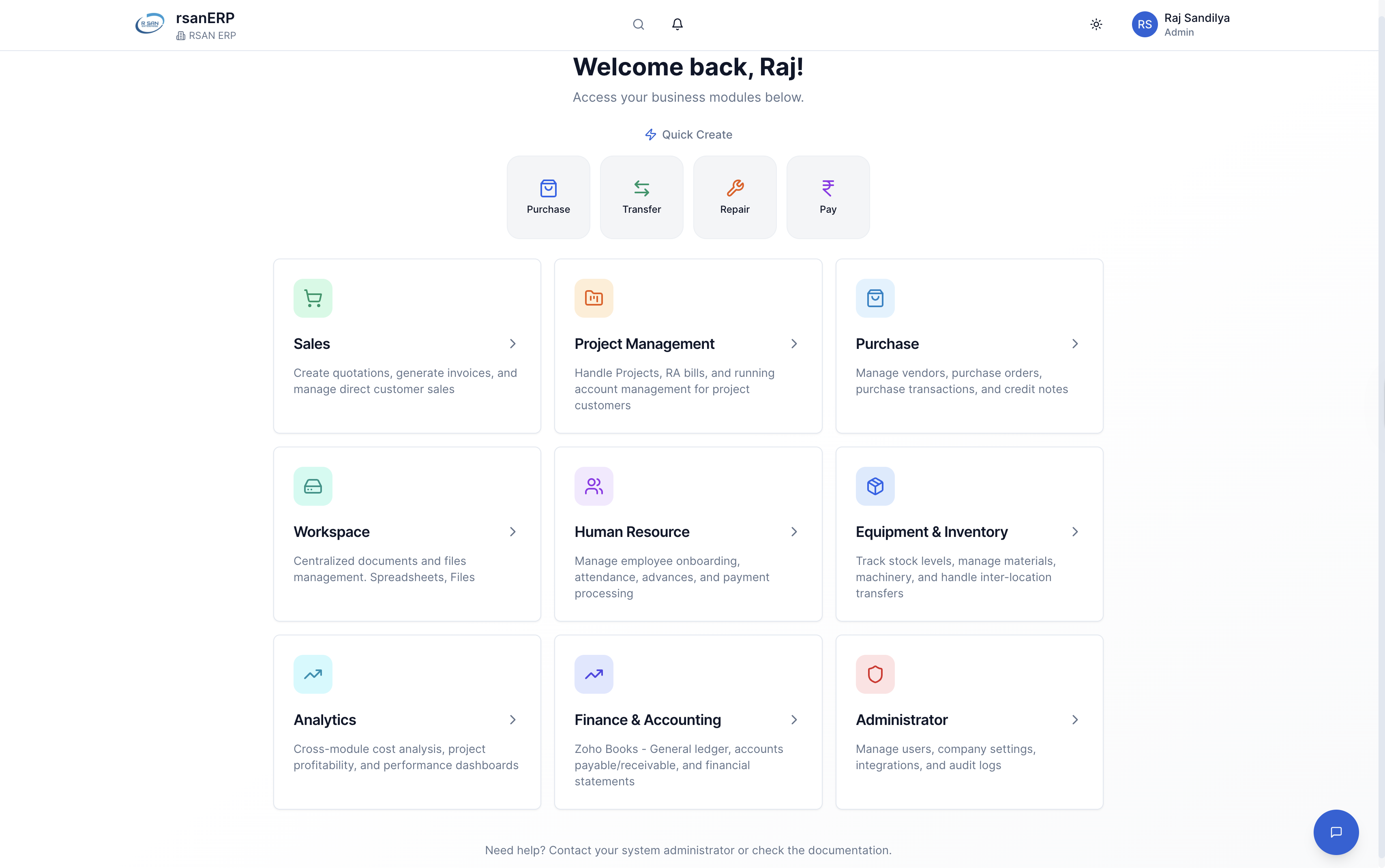
The ERP Home (/) shows a simple card grid for all the modules. There is a Quick Create strip on the home screen that gives you a custom 4x1 grid for one-tap actions like New Invoice or New Project. This is filtered automatically based on what modules the current user is permitted to access.
| Module | Route | Gated By |
|---|---|---|
| Sales | /sales | enabled_modules |
| Project Management | /projects | enabled_modules |
| Purchase | /purchase | enabled_modules |
| Workspace | /workspace | enabled_modules |
| Human Resource | /hrm | enabled_modules |
| Equipment & Inventory | /inventory | enabled_modules |
| Analytics | /analytics | admin role + module |
| Finance & Accounting | external | admin role + module |
| Administrator | /admin | admin role |
| SuperAdmin | /superadmin | superadmin only |
Detailed Capabilities by Module
5.1 Sales Module
Pages: Dashboard, Customers, Quotations, Invoices, Credit Notes, Proforma, RA Bills (project view), Project Dashboard, All Invoices.
- Customer master: Separation of Trade Name (legal) versus
display_name(unique nickname), billing and shipping address mapping, GSTIN, default-type sync, and optional manual Zoho contact ID bypass for legacy migration. - Quotations: General versus Special Terms & Conditions, default unit logic, configurable signature blocks, and clean PDF exports.
- Direct Invoices: Pre-filled default T&C, calculated due dates from payment terms, sequential numbering, and dual-mode PDFs (Detailed line-items versus Summary).
- Shadow item compliance: Non-billable line items can be carried for record-keeping without messing up real tax totals.
- Negative-quantity blocking: Hard blocks at the form level prevent accidental refund-shaped invoices.
- Credit Notes: Automatic IGST versus CGST routing based on place-of-supply, fully linked to the source invoice and mapped to the matching Zoho credit note.
- Proforma Invoices: Separate numbering series with a clear "not-for-tax" stamp.
5.2 Project Management Module
Pages: Projects, Project Detail, Master Items, RA Bills, RA Bill Edit, RA Bill View.
- A unique
project_idconsistent across Inventory (locations, transfers), HRM (attendance, payroll), and Sales (RA bills). - An auto-generated location entity so that the project's site address acts as a real inventory location for material transfers.
- A Master Items list with per-item HSN and GST mappings inherited from the global item master.
- A Financial Summary showing total contracted value, total billed, holds outstanding, and net balance.
5.3 Purchase Module
Pages: Dashboard, Vendors, Orders, Transactions, Credit Notes.
- Vendor master: GSTIN, payment terms, bank details, and Zoho vendor mapping.
- Purchase Orders: Drag-drop item selection, automatic billing company resolution, and signature-bearing PDFs.
- Purchase Transactions: Vendor invoice number priority (the vendor's invoice number takes precedence over the internal reference for matching), and per-line tax-rate overrides for special cases.
- Purchase Credit Notes: Full synchronization with Zoho.
- AI Document Extraction: Purchase invoice images are parsed by Gemini 2.5 Flash to automatically pre-fill line items, GSTIN, and totals.
5.4 Inventory & Equipment Module
Pages: Dashboard, Material, Machinery, Locations, Location Detail, Transactions, Audit Trail, Stock Movements.
- Item master (materials): Configured with HSN, GST, units, categories, average cost, and price history tracking.
- Machinery master: Dedicated repair management, live working status tracking, and machinery-specific stock dialogs.
- Locations: Physical sites, central warehouses, and auto-generated project locations.
- Transactions: Purchase, Consumed, Lost, Scrapped, Purchase Return, and Reconciliation. Each transaction rigorously captures the user's name, email, and timestamp into the
audit_logs. - Reconciliation (RCN): Unifies consumption and material transfers into a single flat reconciliation event without spawning messy child records, keeping the audit story very clean.
- Audit Trail: Deep views into single item histories and comprehensive stock comparisons.
5.5 HRM Module
Pages: Dashboard, Onboarding, Employees, Masters, Attendance, Records, Payments, Slips, Settings.
- Onboarding: Pending status queues, bulk Excel upload, and strict master data validation.
- Employee master: Aadhaar validation, rigid salary structures, fixed deductions, and bank/UPI details.
- Attendance Entry: Sundays visually highlighted (as advance days), featuring a minimized summary panel for daily totals.
- Quick Pay UPI & Exports: One-tap UPI deep-link payments with built-in boundaries, plus pre-formatted bulk bank export CSVs for ICICI, HDFC, and SBI corporate banking templates.
5.6 Workspace Module
Pages: Dashboard, Files, Company Documents, Recent Activity, Trash.
- Backed securely by the organization's connected Google Drive.
- Mirrors the ERP hierarchy: Customers, Vendors, Projects, and RA Bills each get their own folder tree automatically maintained inside Drive.
- Auto-recovery triggers: If a folder is manually deleted in Drive, the next ERP write automatically recreates it.
- Important file lock: Files marked "important" cannot be deleted without an explicit secondary unlock.
5.7 Analytics & 5.8 Finance
- Analytics: Strictly Admin-only. Cross-module roll-ups pull from Inventory consumption, HRM payroll, and Sales billing to calculate accurate project profitability and cost-versus-budget.
- Finance & Accounting: An admin-only bridge router that opens the connected company's Zoho Books in a new tab. No accounting UI is duplicated inside the ERP, the system defers entirely to Zoho as the system-of-record.
5.9 Administrator & 5.10 SuperAdmin
- Administrator: Manage org users, pre-invites, soft-deletes, email changes, companies, signatures, seals, bank details, and all numbering series with default T&Cs.
- SuperAdmin: Platform-level control. Approves, disables, or deletes tenant organizations. Toggles specific modules per organization, manages public sign-ups, views platform-wide analytics, and manages the global auth screen branding.
Feature Deep Dives
6.1 RA Bill Engine (Running Account Bills)
Running Account Bills are the absolute heart of construction billing. Each RA bill represents the cumulative quantity executed on each line item up to a given date, with the new bill's value being the exact difference against the previous bill.
Projects can declare an "RA0" baseline representing work already executed before the system was adopted. Subsequent RA1, RA2 carry this forward automatically.
Each line carries a stable identifier so that quantities flow correctly across versions even if text descriptions are later edited.
Quantities are stored with 6 decimals; UI rounding happens only at render time, eliminating the classic ₹0.01 mismatch between bill totals and sum of lines.
When a hold (retention) is added or removed, the engine redistributes the value pro-rata across the affected lines, validating that the sum exactly reconciles.
Editing a previous RA bill triggers a controlled recompute of all subsequent bills.
Cells accept formulas, support drag-fill, and use O(1) hash maps for instant lookups across thousands of rows.
Export Capabilities: RA Bills support nested attachments (like drawings or photos) that travel with the bill into PDF exports. PDFs utilize Arial-only typography for crisp printing, with configurable display filters. Furthermore, a bill can be cloned directly into a Google Sheet via the Sheets API, preserving the exact ERP layout.
6.2 HRM Payroll Engine
- Recursive balance walk: Rolling balances (advance, deduction, pending dues) are computed by an explicit loop walking from the employee's first-ever entry forward, ensuring a stable result independent of grid order.
- -1 sentinel: The grid distinguishes three states: a real value, a manually-entered zero, and a "deleted" cell. The sentinel
-1represents deletion so downstream aggregations can ignore it without losing audit history. - Debounced calculations & 2-decimal constraints: Cell edits trigger debounced recomputes to avoid lag on fast typists, while money columns strictly enforce 2 decimals at the database schema level.
- Sunday weekly cycle: Submissions are gated to Sundays, ensuring uniform week boundaries across projects.
- Slip PDF generation: Slips are rendered into a fixed-width 794px off-screen HTML node and then captured to canvas, producing pixel-perfect A4 PDFs irrespective of the user's viewport.
6.3 Inventory Transfers
A three-stage transfer workflow ensures physical material movements are reflected accurately in stock without double-counting:
- A SECURITY DEFINER RPC enforces the strict progression rule so clients cannot revert a transfer backwards, even with crafted API requests.
- Stock movements are committed only on DELIVERED, completely eliminating the common "lost-in-transit" double-counting problem.
- Permissions are strictly tier-checked: managers can advance stages, but only admins can hard-cancel a delivered transfer.
6.4 Customer, Invoice & Quotation Systems
- Identity & Address Model:
Trade Nameis the legal name printed on invoices, whiledisplay_nameis a unique short nickname used internally. Billing and shipping addresses are first-class entities; project addresses inherit automatically. - Billing Company Lock: Once a customer's first approved document is issued from a particular company, that pairing is securely locked to prevent accidental cross-entity invoicing.
- Quotation Settings: Features General T&C applied by default, Special T&C appended per quote, configurable Signature blocks, and Default units resolved directly from the item master.
Deep Integrations
7.1 Zoho Books
The ERP treats Zoho Books as the final accounting system-of-record. The integration features:
- OAuth: Per-company OAuth grant with refresh-token rotation handled by edge functions.
- Identity matching: Customers and vendors are intelligently matched by GSTIN and display name.
- Tax Mappings: Items are tax-classified by HSN, and a dedicated TDS settings card maintains live mapping between local TDS codes and Zoho withholding tax IDs.
- Sync Surface: Fully covers
sync-invoice,creditnote,customer,vendor,purchase-bill,purchase-creditnote, andra-invoice. Sync is strictly restricted to GST-registered counterparties by design. Each entity explicitly displays its Zoho sync metadata (like last synced time, Zoho doc ID, and status).
7.2 Google Drive (Workspace)
- Security: AES-256-GCM encryption of OAuth tokens at rest, utilizing an In-Production consent screen.
- Mirrored hierarchy: The ERP automatically creates and maintains a Drive folder tree that perfectly mirrors Customers, Vendors, Projects, and RA Bills.
- Auto-recovery: If a mirrored folder is deleted directly in Google Drive, the next ERP write transparently recreates it. Cross-org access is mathematically impossible due to strict per-org token isolation.
7.3 AI Gateway & 7.4 GSTIN
- Managed AI: A single managed AI gateway powers Smart Search (⌘K) for natural-language routing, a context-aware floating Chat Assistant, a Document Summarizer, and automated Purchase Image Extraction.
- GSTIN Verification: Edge functions actively validate entered GSTINs against the official Indian government registry, returning the precise legal name, address, and registration status during customer/vendor onboarding.
UI, UX & Realtime Notifications
- Visual Language: Zoho Books-inspired minimalism featuring generous whitespace in light mode, and high-density alternating rows (
#111827/#1a2332) in dark mode. Theme toggle covers Light, Dark, and System states. - Color Discipline: Amber is reserved exclusively for warnings and pending statuses.
- Unified Navigation: A top-3 floating sidebar toggle and a unified header that consolidates AI search, theme, notification bell, and the Superadmin context banner.
- Dialog Pattern: All modals follow a strict
max-h-[90vh] overflow-hidden flex-colshell with a flexible scrolling body, guaranteeing native scrolling behavior even for massive forms. Responsive table wrappers gracefully fall back to horizontal scrolling without sacrificing column widths on mobile. - Notifications & Transport: The Notification Bell surfaces server-side filtered alerts via Supabase Realtime
postgres_changes, backed by a robust 60-second fallback poll ensuring zero missed alerts during mobile network handoffs.
Operational Capabilities
HRM employee bulk upload via Excel with precise row-level validation. Full export pipelines to CSV, Excel, and PDF for materials, machinery, stock, RA bills, and reports.
Sequential, company-specific counters for every document type, featuring explicit database cache invalidation to prevent multi-client collisions.
Active forms actively intercept browser history navigation (back/forward/refresh) to prevent devastating accidental data loss during long data entry sessions.
Users and master records support non-destructive soft-delete with restoration. Every inventory movement is permanently timestamped with the acting user's Identity.
Data Isolation & Security
Security is a top priority here. The architecture strongly enforces boundaries so data never leaks between tenants or unauthorized users.
- Strict Tenant Scoping: Every record is scoped to the organization that owns it, so cross-tenant access is completely impossible at the database level[cite: 1].
- Division-Level Isolation: Inside a single organization, division scoping further restricts access to records belonging only to the divisions the user is assigned to[cite: 1].
- Untagged Records: Untagged (division-less) records are strictly visible only to administrators and SuperAdmin users[cite: 1].
- Admin-Bypass: Admins and the SuperAdmin naturally bypass division scoping constraints to oversee the entire organization[cite: 1].
- Role-Restricted Modules: Highly sensitive modules like Administrator, Finance, and Analytics can only be granted to admin roles[cite: 1].
- Immutable Security Profiles: Profile fields like SuperAdmin status, organization membership, and active flags cannot be self-modified by users, only the appropriate authority can alter them[cite: 1].
- Persistent Audit Identities: A user's audit identity is fully preserved across all logs even after their account is deactivated[cite: 1].
- Server-Side Validations: All sensitive fields and critical document numbers are strongly write-validated server-side, regardless of any frontend UI state[cite: 1].
- Isolated Storage: Per-organization storage isolation ensures sensitive HR documents like photos, ID proofs, and bank details remain securely segregated[cite: 1]. Zoho and Google Drive credentials are encrypted individually per organization and per company[cite: 1].
Access Gating & Error Handling
We designed the system to handle access barriers gracefully, providing clear context to users instead of generic crashes.
- Friendly Denials: Direct navigation to a restricted module immediately shows a clean "Access Not Enabled" card displaying the module label, the specific reason (module-not-enabled versus admin-only), and intuitive 'Go Back' or 'Back to Home' buttons[cite: 1].
- Disabled Home States: Module tiles render safely disabled on the ERP Home screen with a "Not Enabled" badge for any unavailable modules[cite: 1].
- Dialog Consistency: Consistent dialog patterns (90vh max height, scrollable body) are used everywhere, alongside explicit confirmation alert dialogs for every single destructive action[cite: 1]. Active forms intercept accidental browser navigation prompts to actively prevent user data loss[cite: 1].
Glossary of Terms
Here are a few common terms you will see in the system:
An RA Bill is a Running Account Bill. This is basically a cumulative project bill we issue periodically to detail all the work done up to a certain date.
When you see RCN, it stands for Reconciliation transaction. It unifies consumption and transfer into one definitive event.
HSN stands for Harmonized System of Nomenclature, which is just the international tax classification code for physical goods.
TDS is Tax Deducted at Source, which is the standard Indian withholding tax mechanism.
For taxes, IGST is the Integrated GST applied specifically on inter-state supplies. On the other hand, CGST and SGST are the Central and State GST applied on intra-state supplies.
GSTIN simply stands for Goods and Services Tax Identification Number.
An Outpass is the first physical stage of an inventory transfer. It just indicates that the material has actually left the source location.
Override Mode is a powerful session for the Superadmin that securely operates inside a specific tenant organization's isolated sandbox.
Finally, a Shadow Item is a non-billable line that we carry safely on an invoice purely for internal record-keeping. It does not affect the final tax totals.
I built this platform focusing on strict tenant isolation, a clean and consistent UX, and deep integrations that actually add accounting value. Because of this, the ERP can easily scale from a small single-company contractor to a massive multi-entity construction group without changing any frontend code. And most importantly, one tenant's data is never accessible to another.